Category Archives: OneDrive for Business

M365AutoLink unattended

Doing logon scripts is easy for some, less easy for others, and in general not great in certain types of environments.

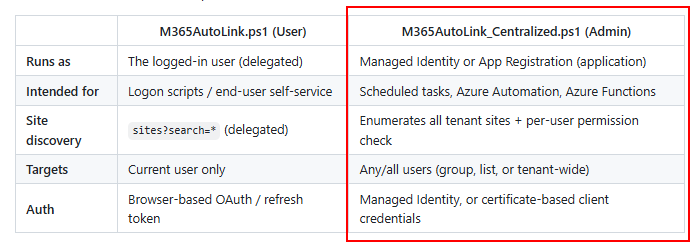
And this led to some questions if I could also make a version of M365AutoLink that can run centrally. There was a hurdle to overcome: how do we know what libraries a user has access to?

M365Permissions already has the answer, so a quick copy paste from the code there and voila, we now have a centrally runnable version of M365AutoLink!

It can run either as managed identity, or cert-based service principal. I recommend running it as a runbook, and don’t run it on tenants with thousands of users or commercially….for commercial use click here 🙂

For full documentation and code: https://github.com/jflieben/M365AutoLink

Unexpected Onedrive Owners

How do you know who the original owner of a Onedrive site was?

The url says a lot, it’s usually in a username_domain_com format. If you have a fixed naming structure and don’t use _’s or other characters that are translated to _, it can be reversed with reasonable accuracy, right?

But what if you have two people with the same name? Or did some migrations or takeovers? Then your logic breaks 🙁

So reverse engineering the URL won’t work, and if an admin takes ownership or if the user leaves and the manager gets ownership, the Owner/Full Control ACL on the site also won’t tell you who the original owner was because it overwrites the Owner property.

In M365permissions the option to audit ownership of Onedrive is built in, as this is a common question during certain types of audits.

But how did we solve it there?

Well, it turns out that Sharepoint’s own metadata service maintains a pretty good track record of who was ever a user on a site, even after they are deleted from Entra.

Thus by doing a call to /_api/web/siteusers?$orderby=Id, we get a nicely ordered list of all users ever assigned to the site.

Pick the first non-system user, and we have our original user! See above 🙂

M365AutoLink

We often still have legacy apps around. First advice is always; get rid of them 🙂

But sometimes, that’s not the option the customer wants to pay for, so alternatives need to be researched. Commercial tools like IAMCloud Drive Mapper work really well in exposing Teams/Sharepoint as driveletters on endpoints (for a price).

But free solutions are limited to automapping using GPO’s or letting users sync each team they need access to manually. This often causes issues on multiple fronts that I’m sure you’ve already experienced if you’re reading this.

So here’s an alternative to try! M365AutoLink is a PowerShell script you can execute on the user’s device. It’ll try to use SSO and then:

  1. check all sites the user has access to (including Teams)
  2. filter sites you do and don’t want
  3. create a folder in their onedrive if it doesn’t exist yet (you can decide how to name it)
  4. add all these sites as shortcuts in this folder
  5. remove any shortcuts the user no longer has access to

And since Onedrive syncs these links, any legacy apps on the user’s device can now also directly access Teams/Sharepoint, without syncing down the entire library or using drive mappings!

Documentation and download

https://github.com/jflieben/M365AutoLink

M365Permissions v1.2.3

Performance improvements and Onenote Notebooks.

Today’s release has a ‘special guest’; Morten (blog)! He completely rewrote the entra user and group retrieval code, greatly improving both performance and total capacity!

Other changes of note:

  1. Add support for Onenote Notebook sharing permissions
  2. Treat anonymous sharing links as ‘deleted’ if the sharing level at the site forbids anonymous sharing

Full changelog here

Download / Use:

M365Permissions module page | Github | PSGallery

M365Permissions v1.2.2

Are you also curious about all those PowerApps and Flows in your environment? Orphaned ones maybe? Or when someone leaves the company?

1.2.2 adds scanning of PowerApps and Flows! Only when using SPN auth. (setup instructions)

In addition to that, I’ve also added provisional support for scans of tenants in USGOV, USDOD and China. Since I don’t have a test tenant there, I’ll have to rely on you to test how it performs there.

Full changelog here

Download / Use:

M365Permissions module page | Github | PSGallery