In the post-Onedrivemapper era where we have Files On Demand, there is still room for improvement in client side configuration of Onedrive for Business. Onedrive Known Folders isn’t up to par yet, doesn’t support any customization and there are situations where I want to be able to redirect local folders to other places than Onedrive like Teams or Sharepoint.
Therefore I present to you “Invoke-O4BAutoMount“; the ultimate Onedrive/Sharepoint/Teams sync and redirect solution in modern workplace scenario’s, no WebDav, just the NSG Onedrive Client and native Intune Management Extension:
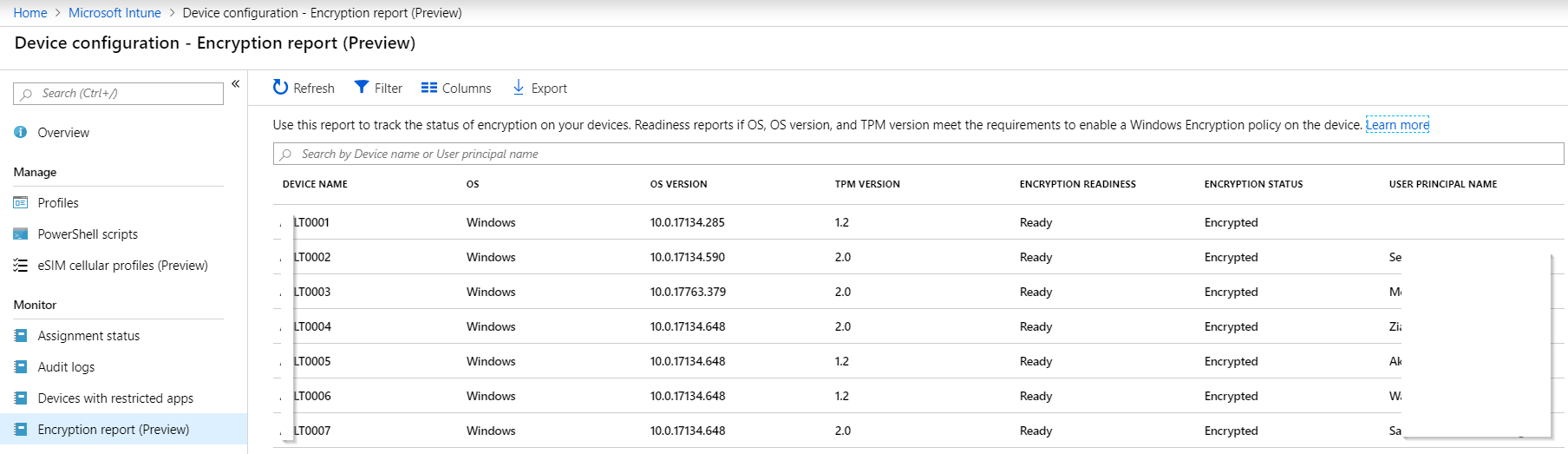
With Intune’s new Bitlocker Encryption Report administrators have an effective way of seeing which of their devices have been encrypted.
But if we want to know if we can actually recover the bitlocker key of a device, we need to know if it was ever uploaded to AzureAD.
Network or local device issues can sometimes prevent the recovery key from reaching AzureAD, resulting in lost data if the device’s disk needs to be recovered for any reason. To hunt down devices that have not escrowed their recovery key to AzureAD, you can use my report function (in PowerShell as always):
In a Windows 10 full MDM (AzureAD+Intune) scenario, you’ll move your email, app and file workloads to Office 365 (or alternatives).
In your pilot or hybrid phase, you may still need access to certain file shares on your servers, so here’s a simple PowerShell script you can deploy using Intune Device Configuration that maps your desired share. Deploy multiple times for multiple shares (or groups of users).
It will create a shortcut in a location you define, so the mapping is always user-driven, it will automatically suggest your user’s AzureAD login as username. You can of course customize the script to your liking if you did not change your local AD upn yet.
I’ve taken information from several sources and written a single “Do It All – Onedrive For Business configuration script” for the Windows 10 Modern Management (Intune MDM Azure AD Join) scenario.
The script can be deployed through Intune to your Windows 10 MDM clients and will do the following silently:
check latest O4B version and update to it
detect O4B configuration, start auto config
completely silent / invisible configuration with SSO