So you’d like to know which applications are living in your AzureAD?
And you’d like to know which of those were added by your admins, and what permissions those applications have?
And you’d also like to know which applications your users are consenting to, and what rights those applications have on your users?
Look no further, I wrote a script to export all of that to Excel for you!
Application overview
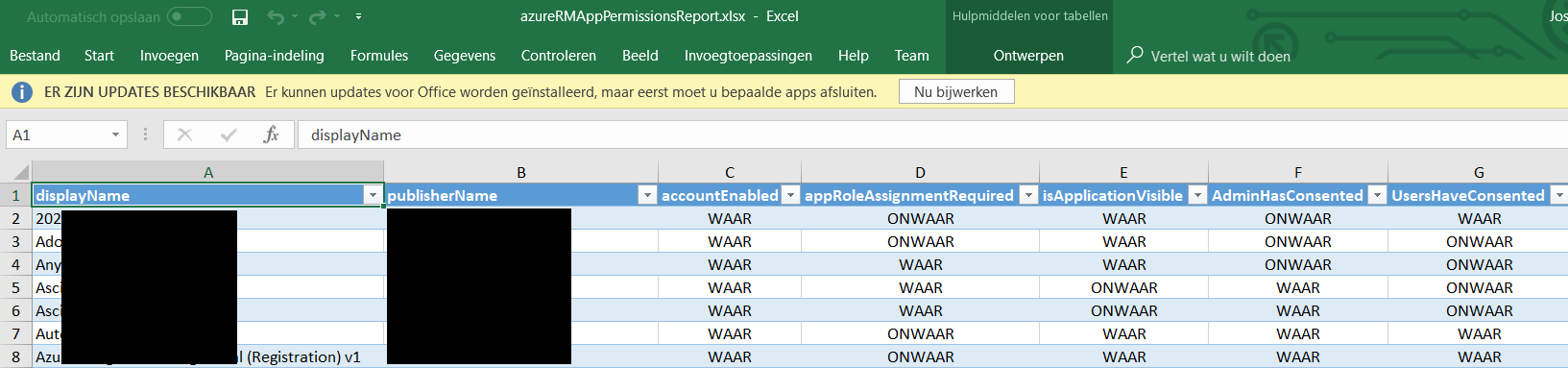
Apps an admin has consented to and the type of rights it needs

Apps a user has consented to and the type of rights it needs

Apps to user mapping, for an easy overview of which user has consented to which app

Get it at:
Credits to Doug Finke for the Excel module I’m using!
I love the script, I needed to tweak it a little to get it running. Like you described get-azureRMtoken doesn’t work with MFA. Maybe you can add an extra parameter for MFA users that calls login-azurermaccount without credentials.
I also got the following error with the export-excel function while exporting the application in line 65 of your script.
Failed exporting data to worksheet ‘Applications’ to ‘c:\temp\report.xlsx’: Cannot find an overload for “TryParse” and the argument count: “4”.
At C:\Program Files\WindowsPowerShell\Modules\ImportExcel\5.1.0\Export-Excel.ps1:671 char:17
+ … throw “Failed exporting data to worksheet ‘$WorkSheetname …
+ ~~~~~~~~~~~~~~~~~~~~~~~~~~~~~~~~~~~~~~~~~~~~~~~~~~~~~~~~~
+ CategoryInfo : OperationStopped: (Failed exportin…ent count: “4”.:String) [], RuntimeException
+ FullyQualifiedErrorId : Failed exporting data to worksheet ‘Applications’ to ‘c:\temp\report.xlsx’: Cannot find an overload for “TryParse” and the argument count: “4”.
Solution was to remove appRoles in the select statement in line 65. I noticed it was not empty for two applications and probably had some unexpected value for the export-excel function.
After that I got a nice overview of the applications registered in Azure AD.
Install-Module ImportExcel
Install-Module AzureRM
modules required to run the script
hi there, incase you ever feel of upgrading the script 🙂
“WARNING: Because the Az modules have all the capabilities of AzureRM modules and
more, we will retire the AzureRM modules on 29 February 2024. Learn more about
the migration to Az: http://aka.ms/azpsmigrate.”