If you want to change the settings on this page (or most Azure Portal pages) programmatically:
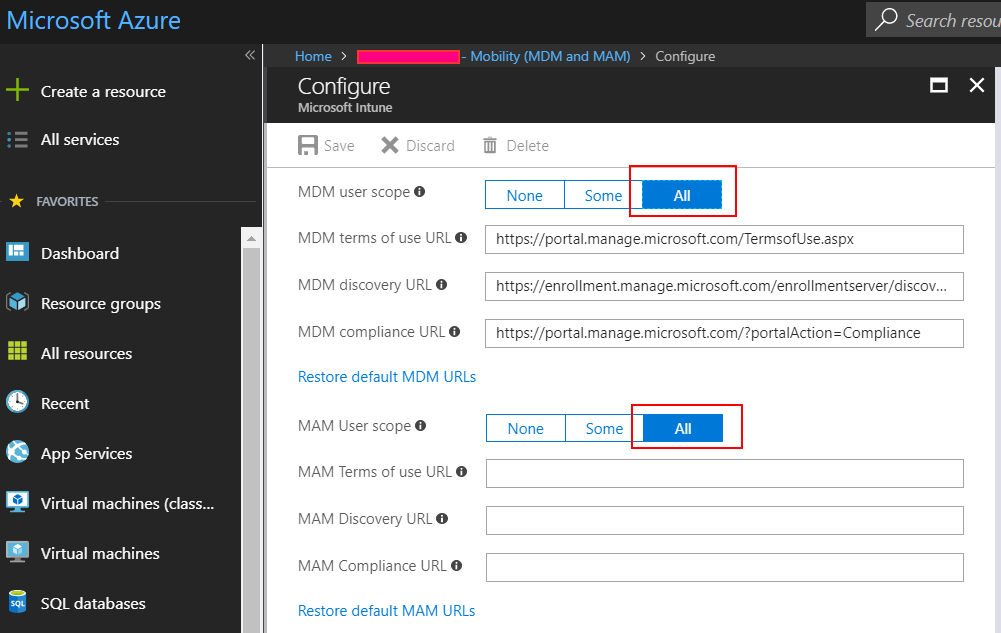
Microsoft’ll tell you to use your browser, there is no API/PS for this yet. As I really hate the answer “no”, I used Fiddler and baked some Powershell:
login-azurermaccount
$context = Get-AzureRmContext
$tenantId = $context.Tenant.Id
$refreshToken = $context.TokenCache.ReadItems().RefreshToken
$body = "grant_type=refresh_token&refresh_token=$($refreshToken)&resource=74658136-14ec-4630-ad9b-26e160ff0fc6"
$apiToken = Invoke-RestMethod "https://login.windows.net/$tenantId/oauth2/token" -Method POST -Body $body -ContentType 'application/x-www-form-urlencoded'

$header = @{
'Authorization' = 'Bearer ' + $apiToken.access_token
'Content-Type' = 'application/json'
    'X-Requested-With'= 'XMLHttpRequest'
    'x-ms-client-request-id'= [guid]::NewGuid()
    'x-ms-correlation-id' = [guid]::NewGuid()
}
$url = "https://main.iam.ad.ext.azure.com/api/MdmApplications/eab0bcaf-9b2e-4e62-b9be-2eea708422f8?mdmAppliesToChanged=true&mamAppliesToChanged=true"

$content = '{"objectId":"eab0bcaf-9b2e-4e62-b9be-2eea708422f8","appId":"0000000a-0000-0000-c000-000000000000","appDisplayName":"Microsoft Intune","appCategory":null,"logoUrl":null,"isOnPrem":false,"appData":{"mamEnrollmentUrl":null,"mamComplianceUrl":null,"mamTermsOfUseUrl":null,"enrollmentUrl":"https://enrollment.manage.microsoft.com/enrollmentserver/discovery.svc","complianceUrl":"https://portal.manage.microsoft.com/?portalAction=Compliance","termsOfUseUrl":"https://portal.manage.microsoft.com/TermsofUse.aspx"},"originalAppData":{"mamEnrollmentUrl":"https://wip.mam.manage.microsoft.com/Enroll","mamComplianceUrl":"","mamTermsOfUseUrl":"","enrollmentUrl":"https://enrollment.manage.microsoft.com/enrollmentserver/discovery.svc","complianceUrl":"https://portal.manage.microsoft.com/?portalAction=Compliance","termsOfUseUrl":"https://portal.manage.microsoft.com/TermsofUse.aspx"},"mdmAppliesTo":2,"mamAppliesTo":2,"mdmAppliesToGroups":[],"mamAppliesToGroups":[]}'
Invoke-RestMethod –Uri $url –Headers $header –Method PUT -Body $content -ErrorAction Stop
You can do almost anything using the above snippet and changing the endpoint URL and POST contents. Use Fiddler to capture, then replicate in code 🙂
Be warned and use at your own risk, obviously this method is unsupported.
Edit 2021: I highly recommend using my new MFA-proof independent token function to call the main.iam API.
Do you know if this api can be called via “client_credentials”? We want to call this api with a service principal. We get the error “AADSTS50058: A silent sign-in request was sent but no user is signed in.”
Do you think it is possible to get banned for this? We do the same thing with b2c
Some calls work, other gives “Value cannot be null.\r\nParameter name: correlationId”
[…] Jos Lieben – Set Intune MDM User Scope to All using PowerShell and hidden API […]
[…] Jos Lieben – Set Intune MDM User Scope to All using PowerShell and hidden API […]
Hello,
I tried to replicate this but got some issues, I can’t find how to get the refresh token. I tried with the new command “Get-AzAccessToken”, but it only returns the access token, and if I try to access the “main.iam.ad.ext” endpoint, I get the following error :