It has long annoyed me that all the scaling options in Azure just add and remove hosts. They never target the host itself. Hosts are either under or overutilized in 84% of the case.
And this is especially relevant for AVD personal hostpools where users each have their own personal “VDI”.
So I’m releasing a custom PowerShell module called “ADDRS” (Azure Data Driven Right Sizing) that grabs mem/cpu performance of the VM or all VM’s in a resource group you tell it to check. It will then do some smart voodoo magic to determine what size out of an allowlist best fits.
Instructions / Example:
- Use -WhatIf if you don’t want it to resize the VM
- Use -Force if you want to resize a VM even if it is online (which will cause it to be shut down!)
- Use -Boot if you want the VM to be started after resizing (by default it will stay deallocated)
- Use -domain with your domain if your VM is domain joined
- Use -region if your region is not westeurope
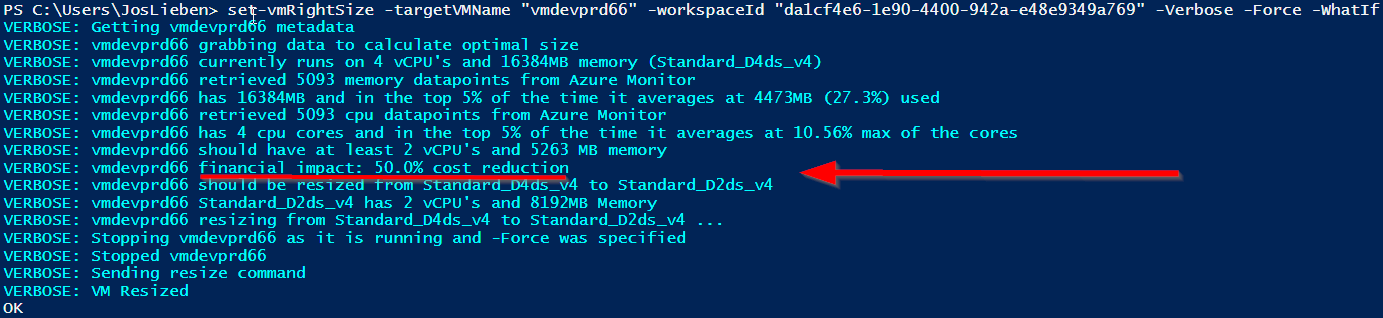
- Use -Verbose if you want the full output incl financial projection
- Use -Report if you want to output data to csv. Can be used together with -WhatIf
- Modify minMemoryGB, maxMemoryGB, minvCPUs, maxvCPUs as desired for your usecase
- You can adjust the preconfigured allowedVMTypes array to only allow specific VM types, by default it contains “Standard_D2ds_v4″,”Standard_D4ds_v4″,”Standard_D8ds_v4″,”Standard_D2ds_v5″,”Standard_D4ds_v5″,”Standard_D8ds_v5″,”Standard_E2ds_v4″,”Standard_E4ds_v4″,”Standard_E8ds_v4″,”Standard_E2ds_v5″,”Standard_E4ds_v5″,”Standard_E8ds_v5”. Overwrite it by using the following parameter:
-allowedVMTypes @(“Standard_D4ds_v4″,”Standard_D8ds_v4”) - use -maintenanceWindowStartHour, -maintenanceWindowLengthInHours and –maintenanceWindowDay if you want to ignore performance data during a maintenance window (e.g. for patching) as that isn’t representative
- Set an Azure Tag called LCRightSizeConfig with the value disabled on machines you want to ignore
- Set an Azure Tag called LCRightSizeConfig with a machine type value (e.g. “Standard_D4ds_v4“) if you want to lock a specific size for that machine, this can be useful if you want the script to resize from current to target automatically when it runs while the VM has been deallocated.
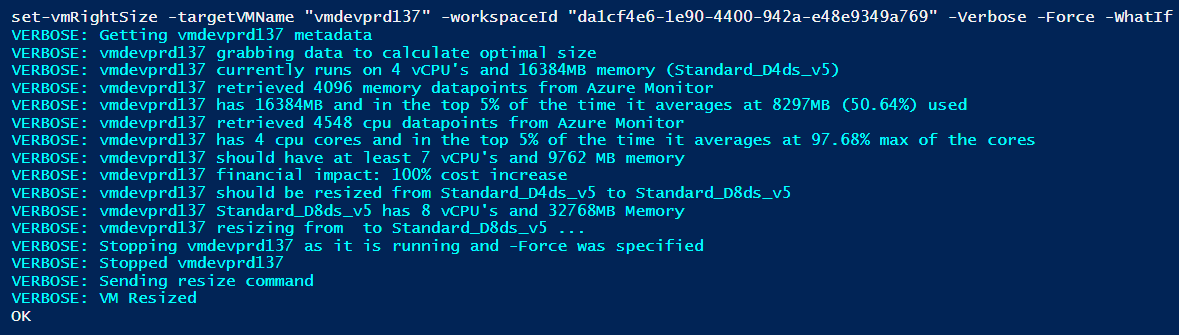
Example -Verbose output of two VM’s being resized:
Requirements:
The module requires that you’ve added the % Processor Time and Available MBytes performance counters to Log Analytics:
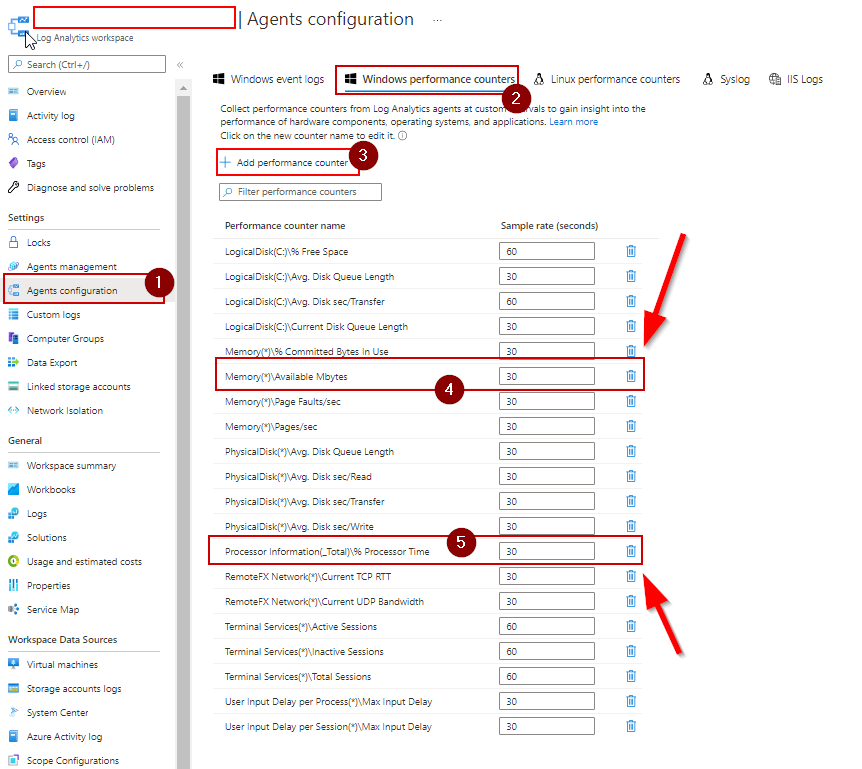
and that your host(s) have the Azure Monitor agent installed.
The module will check if there is sufficient data about the machine in Azure Monitor, if not, no action will be taken. You can determine how far back the function looks by modifying $measurePeriodHours
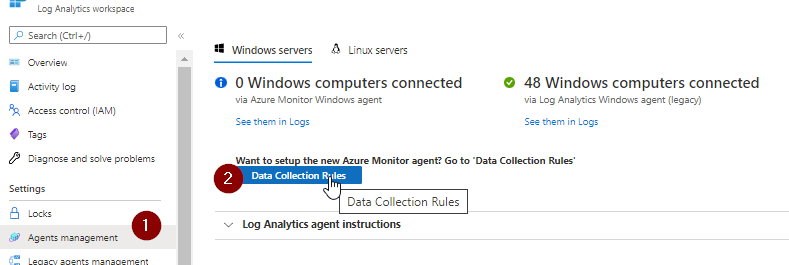
If you’re using the more recent Azure Monitoring agent, add the perf counters here:
Required access
Virtual Machine Contributor to the resource group(s) containing your VM’s and Log Analytics Reader on your log analytics workspace.
Download / Installation
Option 1: Install-Module ADDRS
Option 2: get relevant functions/code from Git
and run the set-vmRightSize or set-rsgRightSize function, e.g.:
set-vmRightSize -targetVMName azvm01 -workspaceId 7ccd0949-2fd4-414e-b58c-c013cc6e445d
set-vmRightSize -targetVMName azvm01 -workspaceId 7ccd0949-2fd4-414e-b58c-c013cc6e445d -allowedVMTypes (“Standard_E8ds_v4″,”Standard_E2ds_v5″,”Standard_E4ds_v5″,”Standard_E8ds_v5”)
set-rsgRightSize -targetRSG rg-avd-we-01 -workspaceId 7ccd0949-2fd4-414e-b58c-c013cc6e445d
Scheduling
If you wish to run this automatically on a schedule, I recommend either using an Azure DevOps pipeline or Automation account. I’ve compiled a small guide on how to use ADDRS in an Azure Automation Account.
Right Sizing Frequency
It is recommended to match job schedules to the lookback period, or at least not run multiple times in the same lookback period. Otherwise, the data that is being used for sizing may not be representative if the machine had already been resized in an earlier run. By default the script will prevent this from happening by checking each vm’s audit log entries.
Issues / notes
- Make sure you’ve got enough data in Log Analytics
- Make sure the allowedVMTypes list contains only VM types that you can actually upgrade to. If e.g. your VM has an ephemeral disk, and your allowList has types that do not, the resize will fail with an error message (but no harm will be done to the existing VM)
- I’ve only tested the maintenance window parameters using UTC time, if you’re using different timezones your results in excluding data generated during the maintenance window may vary from mine
- Spot and Low Priority Azure pricing is excluded by default
[…] https://www.lieben.nu/liebensraum/2022/05/automatic-modular-rightsizing-of-azure-vms-with-special-fo… […]
[…] recommended method to run my ADDRS on a schedule is through an Azure Runbook or an Azure DevOps […]
This is great – would it be possible to do something similar with disk type changes HDD/SSD etc.
Hi Jos.
First of all, thanks for your tool. I’ve found it on YT video https://www.youtube.com/watch?v=OVylkdM0Ask
Just one suggestion, it would be great if you would put here all the required permissions (rbac roles or specific permissions sets) to run this script. That should help setting proper security on any account that will use your tool.
Thanks
Hi Jos,
Thanks very much for this. Unfortunately I am struggling to get the tool to work.
I have plenty of data in the LAW, resources are in same region, have all required permissions etc. But get a ‘<MyVMName> failed to get memory performance data from Azure Monitor because no data returned by Log Analytics’ error message when running the query. Very strange.
This is after retrieving 666 performance rows, VM performance and pricing data cached.
When running the ‘ Virtual Machine available memory’ query in the logs, it shows successful collection of data of the last 7 days.
Might be something stupid I have failed to do but any guidance is appreciated.
Many thanks
Jules
Hey, great guide but i’m getting the following error? Any assistance would be wonderful.
failed to get memory performance data from Azure Monitor because no data returned by Log Analytics.
Was the VM turned on the past hours, and has the ‘Available Mbytes’ or ‘Available Bytes’ counter been turned on, and do you have
permissions to query Log Analytics?
[…] For this VM rightsizing purpose, I also use a script from Jos Lieben, which helps to put your underused VM in the right size in terms of load: Automatic modular rightsizing of Azure VM’s with special focus on Azure Virtual Desktop | Liebensr… […]
Hi,
I tried implementing that solution, which looks great! I have configured all VMs by Azure Monitoring Agent and I get no “Perf” Data in my Log Analytics Workspace. Its all about “InsightMetrics” where I can find the Performance Data. Can I use them aswell?
We get an error, the metrics are there. Tested the kusto query from the module and it give`s result. Any lead?
set-vmRightSize : [servername] failed to get memory performance data from Azure Monitor because Operation returned an invalid status
code ‘NotFound’
For the function “get-vmCounterStats”, what is supposed to go into the “Data” field?
What’s the recommended length of time for log ingestion before running “get-vmRightSize”?
Hello,
I keep receiving the error. set-vmRightSize : <VM-Name> failed to determine optimal size because your $allowedVMTypes list does not contain any VM’s that are available in this subscription and region. Any ideas as to why this is happening?
I’ve been receiving this error message when executing the code
Exception: failed to retrieve available Azure VM sizes in region canadacentral because of GenericArguments[0], ‘Microsoft.Azure.Management.Compute.Models.VirtualMachine’, on ‘T MaxInteger[T](System.Collections.Generic.IEnumerable`1[T])’ violates the constraint of type ‘T’.
Hello I am trying to run this and I’m getting an error “set-vmRightSize : PW10S1ssxxxx failed to get memory performance data from Azure Monitor because Unexpected (negative or too large) memory perf value detected, VM was probably already
resized less than 152 hours ago
At line:1 char:1”
I have plenty of perf data but and the vm has not been resized lately. Why is it saying there’s an unexpected memory perf value detected? Thanks…
Here’s the full output, i did edit the vm a few azure specific things with x’s
PS C:\Users\RIWxxx> set-vmRightSize -targetVMName PW10S1SSxxxx -workspaceID b6b05124-8c9b-4cca-8ea3-aa6xxxxxx -region southcentralus -domain xxxxxxx.net -Verbose -WhatIf
VERBOSE: PW10Sxxx getting metadata
VERBOSE: PW10Sxxx calculating optimal size
VERBOSE: PW10Sxxx grabbing data to calculate optimal size
VERBOSE: PW10Sxxx currently runs on 2 vCPU’s and 8192MB memory (Standard_D2s_v3)
VERBOSE: PW10Sxxxxx querying log analytics: Perf | where TimeGenerated between (ago(152h) .. ago(0h)) and CounterName =~ ‘Available Mbytes’ and Computer =~
‘PW10S1SS30003.r1-core.r1.aig.net’ | project TimeGenerated, CounterValue | order by CounterValue
VERBOSE: PW10xxx retrieved 0 MB (LA type counter) memory datapoints from Azure Monitor
VERBOSE: No data returned by Log Analytics for LA type counter, checking for AM type counter
VERBOSE: PW10Sxxxx querying azure monitor: Perf | where TimeGenerated between (ago(152h) .. ago(0h)) and CounterName =~ ‘Available Bytes’ and Computer =~
‘PW10S.rxxxxnet’ | project TimeGenerated, CounterValue | order by CounterValue
set-vmRightSize : PW10S1SSxxx failed to get memory performance data from Azure Monitor because Unexpected (negative or too large) memory perf value detected, VM was probably already
resized less than 152 hours ago
At line:1 char:1
+ set-vmRightSize -targetVMName PW10S1SSxxx -workspaceID b6b05124-8c9 …
+ ~~~~~~~~~~~~~~~~~~~~~~~~~~~~~~~~~~~~~~~~~~~~~~~~~~~~~~~~~~~~~~~~~~~~~
+ CategoryInfo : NotSpecified: (:) [Write-Error], WriteErrorException
+ FullyQualifiedErrorId : Microsoft.PowerShell.Commands.WriteErrorException,set-vmRightSize
False
Just fyi but I found that if I try to rightsize a vm but that vm is not located in the subscription context that I have set then it doesn’t say it can’t find the VM, instead it gives an error saying:
“Exception: PW10S1ss20390 failed to get VM metadata from azure because the current vm type could not be found in azure’s available vm list, please resize manually to a currently supported size before using this function or wait until it becomes available again. (this is sometimes transitive while Msft scales to customer demand).”
If I set the context to the correct subscription and run it again it find the vms fine and does the resize. If you have multiple subscriptions make sure you set your context correct. Thanks
Hi Jos, I was just curious what the difference is between this script and what azure advisor looks for when it recommends rightsizing VMs? I know advisor is looking at cpu and memory and this script does also but I was curious what the main difference was and if this script is more accurate then advisor? Thanks!
Script has been working great but I have clients that have 10s of thousands of VMs in hundreds of resource groups. Can you add a switch that would allow us to run this against all vms in a subscription? thanks!
I was wondering if you could also add a switch that would only allow the rightsizing of VMs that are going down in size and a separate switch to allow just the vms going up in size to occur. If no switch then both types of resizing will occur. I am sure some clients will be happy to auto lower VM sizes but they may be a little more worried about going up in size even though the perf numbers support it. thanks!
would you mind sharing the % cpu and memory thresholds you are using to determine if a vm needs to be sized up or down? How underutilized/overutilized does a vm need to be for a recommendation to raise/lower their sku size? thanks
hello, i have a 2cpu/8gb vm and the script’s output said “testvm1 should have at least 2 vCPU’s and 4761 MB memory” which is smaller then the vm size currently but then the output says the recommended size is Standard_E2ds_v5 which has 2cpu/16gb memory. The top 5% usage of cpu was 57% and the top 5% memory usage was 50%. I was wondering why the output recommened 4761 MB of memory but then recommneded a larger vm size of 2cpu/8gb mem? thanks!
Output:
VERBOSE: calling set-vmRightSize for testvm
VERBOSE: testvm1 getting metadata
VERBOSE: testvm1 calculating optimal size
VERBOSE: testvm1 grabbing data to calculate optimal size
VERBOSE: Allowed VM types: Standard_E2ds_v5,Standard_D4ds_v5,Standard_D4ds_v4,Standard_E4ds_v5,Standard_D8ds_v5,Standard_D8ds_v4,Standard_E8ds_v5,Standard_E8ds_v4
VERBOSE: testvm1 currently runs on 2 vCPU’s and 8192MB memory (Standard_D2s_v4)
VERBOSE: testvm1 querying log analytics: Perf | where TimeGenerated between (ago(152h) .. ago(0h)) and CounterName =~ ‘Available Mbytes’ and Computer
=~ ‘testvm.domain.net’ | project TimeGenerated, CounterValue | order by CounterValue
VERBOSE: testvm1 retrieved 0 MB (LA type counter) memory datapoints from Azure Monitor
VERBOSE: No data returned by Log Analytics for LA type counter, checking for AM type counter
VERBOSE: testvm1 querying azure monitor: Perf | where TimeGenerated between (ago(152h) .. ago(0h)) and CounterName =~ ‘Available Bytes’ and Computer =~ ‘testvm.domain.net’ | project TimeGenerated, CounterValue | order by CounterValue
VERBOSE: testvm1 has 8192MB and in the top 5% of the time it averages at 4046.77734375MB (49.4%) used
VERBOSE: testvm1 retrieved 1386 cpu datapoints from Azure Monitor
VERBOSE: testvm1 has 2 cpu cores and in the top 5% of the time it averages at 57.54% max of the cores
VERBOSE: testvm1 should have at least 2 vCPU’s and 4761 MB memory
VERBOSE: testvm1 financial impact: 25.53% cost increase
VERBOSE: testvm1 should be resized from Standard_D2s_v4 to Standard_E2ds_v5
VERBOSE: testvm1 Standard_E2ds_v5 has 2 vCPU’s and 16384MB Memory
testvm1 resizing from Standard_D2s_v4 to Standard_E2ds_v5 …
Could you add a switch that lets us either chose the csv output location or a switch that lets us name the output csv file? I have a lot of resource groups to check so I want to run 2 or 3 powershell instances at the same time to check 2-3 resource groups but if i do that the script that finishes last will overwrite the previous addrs-output.csv file. If I could chose the file output path or the name of the file then I could run many powershell instances and check multiple resource groups at the same time. Thanks a bunch!
Hello, since some of my resource groups have 1500 VMs in them the script can take over 5 hours to complete but I am finding after a few hours i get an error saying “Failed to get vm metadata from azure because your credentials have not been setup or have expired, please run connect-azaccount to setup your azure credentials. Sharedtokencachecredential authenticaion unavailable. Token acquisition failed for user. Ensure you have authenticated with a developer tool that supports Azure sso.”
So my token is expiring after a few hours. I don’t think I’ve dealt with this issue before. Any way for the token to be refreshed as part of the script? If i run this a a runbook i still want to get the csv output but since the output is hardcoded to my temp drive I don’t think I can get a cvs output if I try to run this in a automation runbook correct? Any ideas on how I can run this against a large number of VMs and not get the token error? The only other thing I can think of would be if the script let you feed the script a csv file of VM names. That way I could break up the resource group and have the script do about 600 vms at a time. The script starts to fail for me after 600-800 vms in a RG. If I could put 600 vm names in a csv for the script to go through then it would work. thanks for all your responses. rick
Hello. Thank you very much for your work, it is invaluable. Forgive me for my uncertainty, help me figure out what I’m doing wrong or what’s wrong.
Everything was done according to the instructions, but in the end I received a message in the runbook test :
Environments Context
———— ——-
{[AzureCloud, AzureCloud], [AzureChinaCloud, AzureChinaCloud], [AzureUSGovernment, AzureUSGovernment]} Microsoft.Azure.…
OK
vm-srv-02 failed to get memory performance data from Azure Monitor because too few MEM perf data points to reliably calculate optimal VM size
False
I am getting
“failed to determine optimal size because your $allowedVMTypes list does not contain any
VM’s that are available in this subscription and region”
I have added the VM size that our hosts use to the default array
Any clues?
Hi Jos Lieben,
Is there any bug in the module? is it still working?
I am getting belo error :
PS C:\WINDOWS\system32> set-vmRightSize -targetVMName $VMName -workspaceId $Workspace -region $location -verbose -WhatIf
VERBOSE: TestAzVM123 getting metadata
VERBOSE: TestAzVM123 calculating optimal size
VERBOSE: TestAzVM123 grabbing data to calculate optimal size
Loaded cached Azure VM sizes from C:\Users\user12345\AppData\Local\Temp\azureAvailableVMSizes.json
No cache of VM performance and pricing data yet, creating this first….
VERBOSE: GET with 0-byte payload
VERBOSE: received 581014-byte response of content type application/json; charset=utf-8
VERBOSE: GET with 0-byte payload
VERBOSE: received 582739-byte response of content type application/json; charset=utf-8
VERBOSE: GET with 0-byte payload
VERBOSE: received 582542-byte response of content type application/json; charset=utf-8
VERBOSE: GET with 0-byte payload
VERBOSE: received 581383-byte response of content type application/json; charset=utf-8
VERBOSE: GET with 0-byte payload
VERBOSE: received 442300-byte response of content type application/json; charset=utf-8
VERBOSE: 4761 prices retrieved, retrieving performance scores…
VERBOSE: GET with 0-byte payload
set-vmRightSize : TestAzVM123 failed to get pricing and performance data for Azure VM sizes because of 404: Not Found
At line:1 char:1
+ set-vmRightSize -targetVMName $VMName -workspaceId $Workspace -region …
+ ~~~~~~~~~~~~~~~~~~~~~~~~~~~~~~~~~~~~~~~~~~~~~~~~~~~~~~~~~~~~~~~~~~~~~
+ CategoryInfo : NotSpecified: (:) [Write-Error], WriteErrorException
+ FullyQualifiedErrorId : Microsoft.PowerShell.Commands.WriteErrorException,set-vmRightSize
False
Please can you confirm if this module is ok or needs to be looked at. I installed the module but it seems like some dependencies are missing